Showing posts with label APPS. Show all posts

DOWNLOAD HACK 'D World android APP


Share:

How to Change the Auto-Reply Message in Android Auto


Android Auto does a lot to make your phone more useful and safe in the car—it simplifies the interface and limits functionality, only allowing access to key apps that you need while on the go. More recently, Google incorporated an “auto-reply” feature that allows users to quickly reply to incoming messages.

By default, this action is executed with a simple tap of a button, regardless of whether you’re using Auto on the phone or a dedicated Auto head unit. It works with multiple messaging services, like SMS, Facebook Messenger, WhatsApp, Hangouts, and more.
The default reply is set to “I’m driving right now.” But you’re not a “default message” kind of person, are you? You like a little customization in your messages. I can appreciate that. Fortunately, there’s a simple way to change it.
To make matters even nicer, you tweak this all from the Android Auto app, which means it doesn’t matter if you use it as a standalone app or with a dedicated head unit.
First, fire up Auto. Tap the three lines in the upper right corner to access the menu.
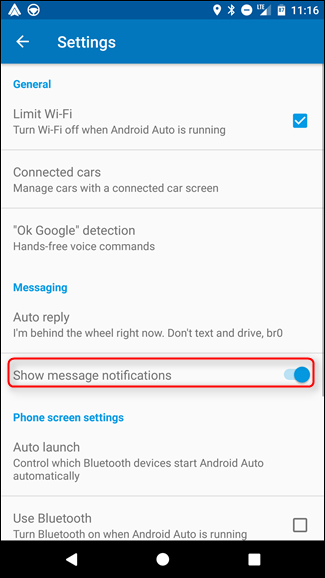
From here, choose “Settings.”
Under the Messaging section, the top option is “Auto Reply.” This is where you’ll change your custom response.
Type in the desired response, click “OK,” and that’s that.
 
Unfortunately, there’s no way to set custom responses on a per-app basis. That means if you plan on using the Auto Reply feature, every app gets the same one. No one is special in Android Auto’s world.
It’s also worth mentioning that you can disable the popup notification that displays when you get a new message by un-toggling the “Show message notifications” option.
 
Bam. Love it.
Share:

What is torrent...(āϟāϰেāύ্āϟ āύিāϝ়ে āϏāĻŦ āĻ•āĻĨা)


āφāĻĒাāύāϰা āĻ•ি āϟāϰেāύ্āϟ āĻāϰ āύাāĻŽ āĻļুāύেāĻ›েāύ? āϜাāύেāύ āϟāϰেāύ্āϟ āĻ•ি? āĻ•ি āĻšāϝ় āϟāϰেāύ্āϟ āĻĻিāϝ়ে? āϝāĻĻি āφāĻĒাāύাāϰ āωāϤ্āϤāϰ āĻšাঁ āĻšāϝ় āϤা āĻšāϞে āĻāχ āϟিāωāύ āϟি āφāĻĒাāύাāϰ āϜāύ্āϝ āύāϝ়। āφāϰ āϝāĻĻি āωāϤ্āϤāϰ āύা āĻšāϝ় āϤা āĻšāϞে āĻāϟি āφāĻĒাāύাāϰ āϜāύ্āϝāχ.........।।


āϟāϰেāύ্āϟ āĻšāϚ্āĻ›ে āĻāĻ•āϟি āĻ…āύāϞাāχāύ āĻĢাāχāϞ āĻļেāϝ়াāϰিং āĻĒ্āϰāϝুāĻ•্āϤি। āϝেāϟি āĻĒিāϝ়াāϰ āϟু āĻĒিāϝ়াāϰ āĻĒ্āϰāϝুāĻ•্āϤি āĻŦ্āϝাāĻŦāĻšাāϰ āĻ•āϰে। āĻāϰ āĻŽাāϧ্āϝāĻŽে āĻĢাāχāϞ āĻļেāϝ়াāϰāĻ•াāϰীāĻ—āύ  āĻāĻ•ে āĻ…āĻĒāϰেāϰ āĻŦ্āϰাāύ্āĻĄāωāχāĻĨ āĻļেāϝ়াāϰ āĻ•āϰে āĻĨাāĻ•ে। āϏাāϧাāϰāĻŖ āĻ­াāĻŦে āφāĻŽāϰা āϝāĻĻি FTP  SERVER āĻĢাāχāϞ āφāĻĒāϞোāĻĄ āĻ•āϰি āĻĒāϰে āϏেāχ āĻĢাāχāϞ āϟি āϝāϤ āĻŦেāĻļি Client āĻĄাāωāύāϞোāĻĄ āĻ•āϰāĻŦে āϤāϤ āĻŦেāĻļি āϚাāĻĒ Server  āĻāϰ āωāĻĒāϰ āĻĒāϰāĻŦে āφāϰ Server  āϤāϤ āĻŦেāĻļি Slow āĻšāϝ়ে āϝাāĻŦে।


āĻ…āĻĒāϰ āĻĻিāĻ•ে P2P SERVER āĻāϰ āĻ•্āώেāϤ্āϰে āĻ•োāύ āφāĻĒāϞোāĻĄ āĻĢাāχāϞ āϝāϤ āĻŦেāĻļি āĻĄাāωāύāϞোāĻĄ āĻšāĻŦে āϤāϤ āĻ­াāϞ āĻĒাāϰāĻĢāϰāĻŽেāύ্āϏ āĻĒাāĻ“āϝ়া āϝাāĻŦে।
āĻĒ্āϰāĻļ্āύ āĻšāϚ্āĻ›ে āĻāϟি āĻ•ি āĻ­াāĻŦে āϏāĻŽ্āĻ­āĻŦ?

P2P āĻāϰ āĻ•্āώেāϤ্āϰে  Client  āĻ•āĻŽ্āĻĒিāωāϟাāϰ āĻ—ুāϞি āĻāĻ•ে āĻ…āĻĒāϰেāϰ Brand with āĻļেāϝ়াāϰ āĻ•āϰে āĻĢāϞে āϏিāϏ্āϟেāĻŽ Slow āĻāϰ āĻŦāĻĻāϞে āĻĢাāϏ্āϟ āĻšāϝ়ে āϝাāϝ়।
āĻāĻ–াāύে āĻŦāϞে āϰাāĻ–া āĻĒ্āϰāϝ়োāϜāύ āϝে āϟāϰেāύ্āϟ āĻšāϞ āĻ…āύāϞাāχāύ āĻĢাāχāϞ āĻļেāϝ়াāϰিংāĻāϰ āĻāĻ• āĻ…āĻĒ্āϰāϤিāϰোāϧ্āϝ āĻĒ্āϰāϝুāĻ•্āϤি।

.torrent
āϟāϰেāύ্āϟ āĻāĻ•্āϏāϟেāύāĻļāύ āϝুāĻ•্āϤ āĻĢাāχāϞ āĻšāϚ্āĻ›ে āĻāĻ•āϟি āĻĒ্āϰāϝ়োāϜāύীāϝ় āϤāĻĨ্āϝ āϏāĻŽৃāĻĻ্āϧ āĻĢাāχāϞ āϝেāĻ–াāύে āϟāϰেāύ্āϟেāϰ āĻŽাāϧ্āϝāĻŽে āϝে āĻĢাāχāϞ āϟি āĻĄাāωāύāϞোāĻĄ āĻ•āϰা āĻšāĻŦে āϤাāϰ āϏāĻŽ্āĻĒāϰ্āĻ•ে āĻ•িāĻ›ু āϤāĻĨ্āϝ āĻĒাāĻ“āϝ়া āϝাāĻŦে āϝেāĻ–াāύে āĻĢাāχāϞāϟিāϰ āύাāĻŽ , āφāĻ•াāϰ āχāϤ্āϝাāĻĻি।

PEER & SEED
Peer āĻšāϚ্āĻ›ে āφāĻĒāύি āϝে āĻ•āĻŽ্āĻĒিāωāϟাāϰ āϏাāĻĨে āϝুāĻ•্āϤ āĻšāϝ়ে āϟāϰেāύ্āϟ Client āĻŦ্āϝাāĻŦāĻšাāϰ āĻ•āϰে āϟāϰেāύ্āϟেāϰ āĻŽাāϧ্āϝāĻŽে āĻĢাāχāϞ āĻĄাāωāύāϞোāĻĄ āĻ•āϰāĻŦেāύ।
āĻ…āĻĒāϰ āĻĻিāĻ•ে SEED āĻŦা SEEDER āĻšāϚ্āĻ›ে āϟāϰেāύ্āϟ Client āĻŦ্āϝাāĻŦāĻšাāϰ āĻ•āϰে āωāĻ•্āϤ āĻĢাāχāϞ āĻāϰ āĻĄাāωāύāϞোāĻĄ āĻ•āϰāĻ›েāύ āĻŦা āĻ•āϰেāĻ›েāύ। āĻāĻ•āϟি āϟāϰেāύ্āϟ āĻāϰ āĻĄাāωāύāϞোāĻĄ āϏ্āĻĒিāĻĄ āωāĻ•্āϤ āϟāϰেāύ্āϟ āĻāϰ SEEDER āĻāϰ āϏংāĻ–্āϝাāϰ āωāĻĒāϰ āύিāϰ্āĻ­āϰ āĻ•āϰে।

SWARM
āϟāϰেāύ্āϟāĻāϰ āĻāĻ•āϟি āĻĢাāχāϞ āĻāϰ āϜāύ্āϝ āϝāϤ SEEDER  āĻŦা āĻĄাāωāύāϞোāĻĄ āĻ•াāϰী āĻāĻ•ে āĻ…āĻĒāϰেāϰ āϏাāĻĨে CONNECTED āĻĨাāĻ•ে āϤাāĻĻেāϰ āϏāĻŽ্āĻŽāϞিāϤ āϏংāĻ–্āϝা  āĻ•ে SWARM āĻŦāϞে

TRACKER
āϟāϰেāύ্āϟāĻāϰ āĻŽাāϧ্āϝāĻŽে āϝāĻ–āύ āĻĢাāχāϞ āĻĄাāωāύāϞোāĻĄ āĻ•āϰা āĻšāϝ় āϤāĻ–āύ PEER āĻ“ SEEDER āĻĻেāϰ āĻŽāϧ্āϝে āϝোāĻ—াāϝোāĻ— āϰāĻ•্āώা āĻ•āϰাāϰ āϜāύ্āϝ āĻāĻ•āϟি SERVER āĻĨাāĻ•ে āĻāχ SERVER āĻ•েāχ āĻŦāϞা āĻšāϝ় TRACKER

āϟāϰেāύ্āϟ āĻāϰ āĻ•িāĻ›ু āωāĻĒāĻ•াāϰিāϤা āφāĻ›ে āφāĻŦাāϰ āĻ…āĻĒāĻ•াāϰিāϤা āĻ“ āφāĻ›ে। āϝেāĻŽāύ āĻāĻ•āĻĻিāĻ•ে āĻĢাāχāϞ āĻļেāϝ়াāϰিং āĻ•āϰা āϝাāϝ় āĻ…āĻĒāϰ āĻĻিāĻ•ে āĻĒ্āϰāϝুāĻ•্āϤিāϰ āĻ•āϞ্āϝাāĻŖে āĻĒাāχāϰেāϏী āĻ“ āĻ•āϰা āϝাāϝ় āĻāĻ–āύে āĻ•াāωāĻ•ে āϧāϰা āϏāĻŽ্āĻ­āĻŦ āύāϝ়। āĻ•াāϰāύ āϟāϰেāύ্āϟ āĻ•োāύ āĻ•োāĻŽ্āĻĒাāύি āύāϝ়  āĻāϟি āĻĢাāχāϞ āĻļেāϝ়াāϰিং āĻĒāĻĻ্āϧāϤি āĻŽাāϤ্āϰ

TORRENT FILE
āϟāϰেāύ্āϟ āĻĢাāχāϞ āĻšāϞ āĻāĻ•āϟি āĻĒ্āϰāϝ়োāϜāύীāϝ় āϤāĻĨ্āϝ āϏāĻŽৃāĻĻ্āϧ āĻĢাāχāϞ
āĻāϟি āĻ…āύেāĻ•āϟি āĻ–াāĻŦাāϰেāϰ āĻŽেāύুāϰ āĻŽāϤ āϝাāϰ āĻĻ্āĻŦাāϰা āφāĻĒাāύাāϰ āĻĻāϰāĻ•াāϰি āĻĢাāχāϞ āĻ—ুāϞি āĻ•োāĻĨা āĻĨেāĻ•ে āĻĄাāωāύāϞোāĻĄ āĻ•āϰāϤে āĻšāĻŦে āϤাāϰ āĻ•āϤ āϏাāχāϜ  āĻāχ āϏāĻŦ āϜাāύাāĻŦে। āĻ…āύেāĻ• āϏāĻŽāϝ় āϏাāϧাāϰāĻŖ āĻĢাāχāϞ āĻĄাāωāύāϞোāĻĄ āĻ•āϰাāϰ āĻĒāϰ āĻĻেāĻ–া āĻ—েāϞ āϝে āĻĻāϰāĻ•াāϰি āĻĢাāχāϞ āĻ›াāĻĄ়াāĻ“ āϤাāϰ āĻ›āĻŦি āĻŦা āĻ—াāύ āϰেāĻ–ে āĻĻিāϝ়েāĻ›ে āĻĢāϞে āϏাāϧাāϰāĻŖ āϏāĻŽāϝ়েāϰāĻ“  āĻŦেāĻļāĻ•িāĻ›ুāĻ•্āώāĻŖ āĻŦāϏে āĻĨাāĻ•āϤে āĻŦাāϧ্āϝ āĻšāϝ়েāĻ›ে। āϟāϰেāύ্āϟ āĻāϰ āĻ•্āώেāϤ্āϰে āĻāχ āĻ…āϏুāĻŦিāϧা āύেāχ। āφāĻĒāύি āϟāϰেāύ্āϟ āĻĢাāχāϞ āϟি āĻĄাāωāύāϞোāĻĄ āĻ•āϰাāϰ āĻĒāϰ āϏেāϟি āϟāϰেāύ্āϟ Client āĻĻিāϝ়ে āĻ“āĻĒেāύ āĻ•āϰāϞে āϏেāχ āĻĢাāχāϞ āϟি āϤে āĻ•ি āĻĄাāωāύāϞোāĻĄ āĻ•āϰāϤে āϝাāϚ্āĻ›ে āϤাāϰ āϞিāϏ্āϟ āĻĻেāĻ–াāĻŦে
āφāĻĒাāύাāϰ āϝে āĻĢাāχāϞ āĻ—ুāϞি āĻĒ্āϰāϝ়োāϜāύ āύেāχ āϏেāĻ—ুāϞি āφāύāϚেāĻ• āĻ•āϰে āĻŦাāĻĻ āĻĻিāϤে āĻĒাāϰāĻŦেāύ। āĻĢāϞে āϝাāĻĻেāϰ āϞিāĻŽিāϟেāĻĄ āĻŦ্āϰাāύ্āĻĄāωāχāĻĨ āϤাāĻĻেāϰ āĻ–ুāĻŦ āωāĻĒāĻ•াāϰ āĻšāĻŦে।

Share:

B4 Beginning


Excel Tutorial- Learn Excel in 30 Minutes
āĻ•েāω āϝāĻĻি āϜিāϜ্āĻžেāϏ āĻ•āϰে- "āĻāĻŽāύ āĻāĻ•āϟা āϏāĻĢāϟāĻ“ā§Ÿাāϰেāϰ āύাāĻŽ āĻŦāϞেāύ, āϝেāϟা āĻĻুāύি⧟াāϰ āϏāĻŦ āϚাāĻ•āϰিāϤে āϞাāĻ—ে"। āϤাāĻšāϞে āφāĻŽাāϰ āωāϤ্āϤāϰ āĻšāĻŦে- āĻŽাāχāĻ•্āϰোāϏāĻĢāϟ āĻāĻ•্āϏেāϞ। āχāĻž্āϜিāύি⧟াāϰ, āĻĄাāĻ•্āϤাāϰ, āϏেāϞāϏ, āĻāĻ•াāωāύ্āϟিং, āĻŦিāϜāύেāϏāĻŽ্āϝাāύ, āĻŽাāϰ্āĻ•েāϟিং, āĻāĻŽāύāĻ•ি āĻ•āĻŽ্āĻĒিāωāϟাāϰ āĻĒ্āϰোāĻ—্āϰাāĻŽিং āϏāĻš āĻĻুāύি⧟াāϰ ⧝ā§Ģ% āϚাāĻ•āϰি āĻāĻ•্āϏেāϞ āĻ›া⧜া āĻ…āϚāϞ। āϤাāχ āφāϜāĻ•েāχ āĻāĻ•্āϏেāϞ āĻ–ুāϞে āϚাāϰ্āϟ āĻŦাāύাāύো, AutoSum, āĻĄাāϟা filter, sort, āĻ›োāϟāĻ–াāϟো āĻĢāϰ্āĻŽুāϞা āφāϰ āĻĢাংāĻļāύ āĻŦ্āϝāĻŦāĻšাāϰ āĻļিāĻ–ে āĻĢেāϞো। āφāϰ column āĻŦা Row āĻ•িāĻ­াāĻŦে āĻĢ্āϰিāϜ āĻ•āϰāϤে āĻšā§Ÿ āϏেāϟা āϜাāύāϞে āϤুāĻŽি āϚাāĻ•āϰিāϤে āĻ…āύেāĻ•āĻ–াāύি āĻāĻ—ি⧟ে āϝাāĻŦে। āĻāχ āĻŦেāϏিāĻ• āϜিāύিāϏāĻ—ুāϞা āύা āϜাāύāϞে ā§Šā§ĻāĻŽিāύিāϟেāϰ āĻāχ āĻ­িāĻĄিāĻ“āϟা āĻĻেāĻ–ে āύাāĻ“


āϟাāχāĻĒিং āϏ্āĻĒিāĻĄ:

āĻŦিāĻļ্āĻŦাāϏ āĻ•āϰো āφāϰ āύাāχ āĻ•āϰো- āϏেāĻ•েāύ্āĻĄ āχāĻŽ্āĻĒāϰāϟ্āϝাāύ্āϟ āϏ্āĻ•িāϞ āĻšāϚ্āĻ›ে- āϟাāχāĻĒিং āϏ্āĻĒিāĻĄ। āĻļুāϧু āĻŦ্āϝাংāĻ•েāϰ āϚাāĻ•āϰি, āĻĒ্āϰোāĻ—্āϰাāĻŽিং āĻŦা āĻ•āϞ āϏেāύ্āϟাāϰেāϰ āϜāĻŦ āύা āĻŦāϰং āĻŦেāĻļিāϰāĻ­াāĻ— āϜāĻŦ, āĻāĻŽāύāĻ•ি āĻĒ্āϰেāĻŽ āĻĒীāϰিāϤিāϰ āϚ্āϝাāϟিং āĻ•āϰে āĻĄেāχāϞি āϚাāϰ-āĻĒাঁāϚāϘāύ্āϟা āϝা⧟ āϟাāχāĻĒিং⧟েāϰ āĻĒিāĻ›āύে। āϏেāϜāύ্āϝāχ āĻŦেঁāϚে āĻĨাāĻ•āϤে āĻšāϞে āϟাāχāĻĒিং āϏ্āĻĒিāĻĄ ā§Šā§¨ āĻ“ā§Ÿাāϰ্āĻĄ āĻĒাāϰ āĻŽিāύিāϟ āĻāϰ āωāĻĒāϰে āĻšāϤে āĻšāĻŦে। āϤাāχ āĻāĻ•āĻĻāĻŽ āϟাāχāĻĒিং āϏāĻŽ্āĻĒāϰ্āĻ•ে āϧাāϰāĻŖা āύা āĻĨাāĻ•āϞে typing.com āĻ āĻ—ি⧟ে āĻļূāύ্āϝ āĻĨেāĻ•ে āĻļুāϰু āĻ•āϰো। āφāϰ āύা āĻĻেāĻ–ে āϟাāχāĻĒ āĻ•āϰাāϰ āĻ…āĻ­্āϝাāϏ āĻĨাāĻ•āϞে āĻāχāĻ–াāύে āĻ—ি⧟ে typing test āĻĒ্āϰাāĻ•āϟিāϏ āĻ•āϰো।

āχāĻŽেāχāϞ:

āĻĨাāϰ্āĻĄ āχāĻŽ্āĻĒāϰāϟ্āϝাāύ্āϟ āϏ্āĻ•িāϞ āĻšāϚ্āĻ›ে- āχāĻŽেāχāϞ। āĻ•াāϰāĻŖ āĻĒ্āϰāĻĢেāĻļāύাāϞ āϞেāĻ­েāϞে ā§Žā§Ļ% āĻ•āĻŽিāωāύিāĻ•েāĻļāύ āĻšā§Ÿ āχāĻŽেāχāϞে। āχāĻĢেāĻ•্āϟিāĻ­ āϏাāĻŦāϜেāĻ•্āϟ āϞাāχāύ, āĻ—ুāϰুāϤ্āĻŦāĻĒূāϰ্āĻŖ āĻ•āĻĨা āĻ›োāϟ āĻ›োāϟ āĻĒ⧟েāύ্āϟ āĻ•āϰে āĻĻুāχ āĻĨেāĻ•ে āϤিāύ āĻĒ্āϝাāϰাāĻ—্āϰাāĻĢেāϰ āĻŽāϧ্āϝে āχংāϞিāĻļে āϞিāĻ–ে āĻĢেāϞাāϰ āĻĒ্āϰাāĻ•āϟিāϏ āĻ•āϰāϤে āĻšāĻŦে। āχāĻĢেāĻ•্āϟিāĻ­ āχāĻŽেāχāϞ āϟিāĻĒāϏ āϜাāύāϤে email writting tips āϞেāĻ–াāϟা āĻ–ুঁāϟি⧟ে āĻ–ুঁāϟি⧟ে āĻĒ⧜ো। āφāϰ āχāĻŽেāχāϞেāϰ āĻĒাāĻļাāĻĒাāĻļি āχংāϞিāĻļে āϏ্āĻĒিāĻ•িং-āϰাāχāϟিং, āĻĒ্āϰেāϜেāύ্āϟেāĻļāύ āϏ্āĻ•িāϞ āĻĄেāĻ­েāϞāĻĒ āĻ•āϰāϤে āĻĒাāϰāϞে, āĻ…āĻĢিāϏে āĻ—ি⧟ে āĻ•োāύা⧟ āϞুāĻ•ি⧟ে āĻĨাāĻ•া āϞাāĻ—āĻŦে āύা।

āĻĒ্āϰোāĻ—্āϰাāĻŽিং āĻāϰ āĻŦেāϏিāĻ• āĻ•āύāϏেāĻĒ্āϟ:

āĻ•āĻŽ্āĻĒিāωāϟাāϰ, āϰোāĻŦāϟ āĻāĻŦং āφāϰ্āϟিāĻĢিāĻļি⧟াāϞ āχāύ্āϟেāϞিāϜেāύ্āϏিāϰ āϝুāĻ—ে-āĻĒ্āϰোāĻ—্āϰাāĻŽিং āĻ āĻĻāĻ•্āώāϤা āύা āĻĨাāĻ•āϞেāĻ“, āĻĒ্āϰোāĻ—্āϰাāĻŽিং āĻāϰ āĻŦেāϏিāĻ• āĻ•āύāϏেāĻĒ্āϟ, āϏāĻĢāϟāĻ“ā§Ÿ্āϝাāϰ āĻ•িāĻ­াāĻŦে āĻ•াāϜ āĻ•āϰে, āĻ•িāĻ­াāĻŦে āĻŦাāύাāύো āĻšā§Ÿ āϏেāĻ—ুāϞাāϰ āωāĻĒāϰ āĻšাāϞāĻ•া āϧাāϰāĻŖা āĻĨাāĻ•āϤে āĻšāĻŦে। āύāϚেā§Ž āϜীāĻŦāύে āϚৈāϞāϤো āύ। āĻāĻŽāύāĻ•ি āĻāĻ•্āϏেāϞে āϏিāĻŽ্āĻĒāϞ āĻĢāϰāĻŽুāϞা āĻŦা āĻĢাংāĻļāύāĻ“ āϝে āϟুāĻ•িāϟাāĻ•ি āĻĒ্āϰোāĻ—্āϰাāĻŽিং āϏেāϟা āĻŦুāĻাāϰ āϜāύ্āϝ āĻĒ্āϰোāĻ—্āϰাāĻŽিং āĻāϰ āĻŦেāϏিāĻ• āφāχāĻĄি⧟া āĻĨাāĻ•া āĻĻāϰāĻ•াāϰ। āϤাāχ āĻšুāĻ•ুāĻļ āĻĒাāĻ•ুāĻļ āĻŦা āĻšাāĻŦāϞুāĻĻেāϰ āϜāύ্āϝ āĻĒ্āϰোāĻ—্āϰাāĻŽিং āĻāϰ āĻ­িāĻĄিāĻ“āĻ—ুāϞো āĻĻেāĻ–āϤে āĻĒাāϰো

āĻ­āϞাāύ্āϟি⧟াāϰিং:

āϚাāĻ•āϰিāϤে āϜ⧟েāύ āĻ•āϰাāϰ āφāĻ—েāχ- āϜāĻŦ āϰেāϏāĻĒāύāϏিāĻŦিāϞিāϟি, āĻĄেāĻĄāϞাāχāύেāϰ āĻĒ্āϰেāϏাāϰ, āĻŦāϏেāϰ āĻা⧜ি, āĻ•āϞিāĻ—āĻĻেāϰ āĻ…āϏāĻšāϝোāĻ—িāϤা āϏāϤ্āϤ্āĻŦেāĻ“ āĻ•াāϜ āύাāĻŽি⧟ে āύে⧟াāϰ āĻ…āĻ­িāϜ্āĻžāϤা āĻ…āϰ্āϜāύ āĻ•āϰāϤে āϚাāχāϞে āĻ­াāϰ্āϏিāϟিāϰ āĻ•োāύ āĻ•্āϞাāĻŦ āĻŦা āĻ­āϞাāύ্āϟি⧟াāϰিং āĻ…āϰ্āĻ—াāύাāχāϜেāĻļāύে āϏিāϰি⧟াāϏāϞি āĻ•াāϜ āĻ•āϰো। āĻ•āĻŽিāϟিāϰ āĻŽেāĻŽ্āĻŦাāϰ āĻšāĻ“। āϤাāĻšāϞে āĻāĻ•āχ āϏাāĻĨে āĻ•āĻŽিāωāύিāĻ•েāĻļāύ āϏ্āĻ•িāϞ, āĻĻা⧟িāϤ্āĻŦ āύি⧟ে āϏāĻŽā§ŸāĻŽāϤো āĻ•াāϜ āύাāĻŽাāύো, āϟিāĻŽ-āĻ“ā§Ÿাāϰ্āĻ•, āϞিāĻĄাāϰāĻļীāĻĒ, āϟাāχāϟ āĻĄেāĻĄāϞাāχāύ, āĻĒ্āϰāϜেāĻ•্āϟ āĻŽ্āϝাāύেāϜāĻŽেāύ্āϟ, āϟাāχāĻŽ āĻŽ্āϝাāύেāϜāĻŽেāύ্āϟ āϏāĻš āϏāĻŦ āϏ্āĻ•িāϞ āϏু⧜āϏু⧜ āĻ•āϰে āϤোāĻŽাāϰ āĻĒāĻ•েāϟে āϜāĻŽা āĻšāϤে āĻĨাāĻ•āĻŦে।
āĻ•্āϝাāϰি⧟াāϰ āĻļুāϰুāϰ āφāĻ—ে āĻāχ āĻĒাঁāϚāϟা āϏ্āĻ•িāϞ āĻĄেāĻ­েāϞāĻĒ āĻ•āϰে āĻĢেāϞো। āϤাāĻšāϞে āĻĻেāĻ–āĻŦে- āĻ…āύ্āϝāϰা āϝāĻ–āύ āϚাāĻ•āϰি āĻ–ুঁāϜāϤেāĻ›ে āϤুāĻŽি āϤāĻ–āύ āĻĒ্āϰāĻŽোāĻļāύেāϰ āĻĒা⧟āϤাāϰা āĻ•āϰāϤেāĻ›ো।
Share:

⧧⧝āϟি Best Coding Software Editors (updates 2017)

āĻ­াāϞো āĻŽাāύেāϰ āĻ•োāύ coding software āφāĻĒāύাāϰ coding skill improvement āĻāϰ āϜāύ্āϝ āĻ…āĻĒāϰিāĻšাāϰ্āϝ। āύেāϟে coding software āĻāϰ āĻ…āĻ­াāĻŦ āύেāχ, āĻ­াāϞো-āĻ–াāϰাāĻĒেāϰ āĻŽāϧ্āϝে āĻ­িāύ্āύāϤা āφāĻ›ে। āϝেāĻŽāύ āϟা āϧāϰুāύ, Dreamweaver!!! āĻāĻ•āϟু āϚেāώ্āϟা āĻ•āϰে āĻĻেāĻ–ুāύ design āĻāϰ āĻ•োāύ code āϞিāĻ–āϤে, āĻšā§ŸāϤোāĻŦা āĻāĻŽāύ āĻŦিāϚ্āĻ›িāϰি āĻ•োāĻĄ āφāĻĒāύি āĻ•āĻ–āύāχ āĻĻেāĻ–āĻŦেāύ āύা, āĻšā§ŸāϤো āĻŦুāĻāϤে āĻŦুāĻāϤেāĻ“ āϘāύ্āϟাāϰ āĻĒāϰ āϘāύ্āϟা āĻ•াāϟি⧟ে āĻĻিāĻŦেāύ, āĻ•াāϜেāϰ āĻ•াāϜ āĻ•িāĻ›ুāχ āĻšāĻŦেāύা। āϝাāχ āĻšোāĻ•, āĻāĻ–āύ āĻĒ্āϰāĻļ্āύ āĻšāϞো, What Is The Best Coding Software Editor?


āφāĻŽি āĻ•িāĻ›ু software āĻāϰ use āĻ•āϰেāĻ›ি, āϝেāĻ—ুāϞোāϰ āĻ•োāύāϟাāĻ•ে āĻ›ে⧜ে āĻ•োāύāϟা āĻĻিāĻŦ, choose āĻ•āϰāϤে āĻĒাāϰāĻŦ āύা, āĻ•াāϰāύ āĻĒ্āϰāϤ্āϝেāĻ• āϟাāχ āĻ…āϏ্āĻĨিāϰ āφāϰ āĻ–ুāĻŦ āĻ•াāϜেāϰ। āϤāĻŦে, āφāĻŽাāϰ āĻŽāϤে āϏāĻŦāϚে⧟ে best āĻšāϞোঃ Atom


  atom āĻ āĻ•ি āύেāχ? āĻ•ি āĻ•ি Language support āĻ•āϰে? HTML, CSS, Less, Sass, GitHub Flavored Markdown, C/C++, C#, Go, Java, Objective-C, JavaScript, JSON, CoffeeScript, Python, PHP, Ruby, Ruby on Rails,shell script, Clojure, Perl, Git, Make, Property List (Apple), TOML, XML, YAML, Mustache & SQL.

āĻĄাāĻ“āύāϞোāĻĄ āϞিংāĻ•ঃ https://atom.io    


 List of TOP Coding Software


1. Aptana Studio (Windows, Linux, Mac OS X) (FREE)

  Aptana Studio is a complete web development environment that combines powerful authoring tools for HTML, CSS, and JavaScript, along with thousands of additional plugins created by the community. Features of Aptana Studio:
  • Unified Editing for Web Apps
  • Ajax and JavaScript Libraries
  • Ruby on Rails, Python and PHP
  • Desktop Ajax
  • Free, Open Source and Cross Platform
 

2. SlickEdit (Windows, Linux, Mac OS X) (FREE Trial; 299$)

SlickEdit is the multi-platform, multi-language code editor that gives programmers the ability to create, navigate, modify, build, and debug code faster and more accurately. Features of SlickEdit:
  • Display symbol details with List Members, function/method argument help, and formatted Javadoc/XMLdoc/Doxygen comments
  • Analyze symbols and hierarchy with a rich set of tools including Symbols, Class, References, and Find Symbol tool windows
  • Check in and check out from version control
  • Diff files and directories
  • Preview the definition for the symbol under the cursor automatically without lifting a finger. The Preview tool window shows the definition and formatted Javadoc/XMLdoc/Doxygen comments.
  • Edit files up to 2 GB
 

3. jEdit (Windows, Linux, Mac OS X) (FREE)

jEdit is a mature programmer’s text editor with hundreds (counting the time developing plugins) of person-years of development behind it. Features of jEdit:
  • Built-in macro language
  • Plugins can be downloaded and installed from within jEdit using the “plugin manager” feature.
  • Auto indent, and syntax highlighting for more than 130 languages.
  • Supports a large number of character encodings including UTF8 and Unicode.
  • Folding for selectively hiding regions of text.
  • Word wrap.
  • Highly configurable and customizable.
 

4. IntelliJ IDEA (Windows, Linux, Mac OS X) (FREE; €86 to €516)

IntelliJ IDEA is a code-centric IDE focused on developer productivity. IntelliJ IDEA deeply understands your code and gives you a set of powerful tools without imposing any particular workflow or project structure. IntelliJ IDEA is your dream pair-programmer who knows its way around the codebase, makes great suggestions right when you need them, and is always ready to help you shape your code. Features of IntelliJ IDEA:
  • Advanced Code Editing
  • Supported Languages
  • Technologies & Frameworks
  • Teamwork Facilitation
  • Code Quality Features
  • Integrated Environment
  • Customization & Extensibility
 

5. Notepad++ (Windows) (FREE)

Notepad++ is a free source code editor and Notepad replacement that supports several languages. Running in the MS Windows environment, its use is governed by GPL License. Features of Notepad++:
  • Syntax Highlighting and Syntax Folding
  • WYSIWYG
  • User Defined Syntax Highlighting
  • Auto-completion
  • Multi-Document
  • Multi-View
  • Regular Expression Search/Replace supported
  • Full Drag ‘N’ Drop supported
  • Dynamic position of Views
  • File Status Auto-detection
  • Zoom in and zoom out
  • Multi-Language environment supported
  • Bookmark
  • Brace and Indent guideline Highlighting
  • Macro recording and playback
   

6. SCREEM (Linux) (FREE)

 SCREEM is a web development environment. It’s purpose is to increase productivity when constructing a site, by providing quick access to commonly used features. While it is written for use with the GNOME desktop environment in mind it does not specifically require you to be running it, just have the libraries installed. Features of SCREEM:
  • Broken Link Checking
  • CTags Support
  • Cut / Paste
  • CVS Support
  • Document Structure Display
  • DTD/Doctype Parsing
  • Helper Applications
  • Inline Tagging
  • Intelliclose
  • Link Fixing
  • Page Previewing
  • Page Templates
  • Publishing
  • Recent documents / Projects
  • Search / Replace
  • Select Context
  • Spell Checking
  • Syntax Highlighting
  • Tag Trees
  • Task management
  • Wizards
 

7. EmEditor (Windows) (FREE Trial; €32.15)

  
EmEditor is a lightweight, but extensible, commercial text editor for Microsoft Windows. Although designed for Windows XP, the program is also certified for use with Windows Vista. Available editions of the program include the 32-bit edition and the 64-bit edition, and the program also includes a portability option to set up a removable drive, such as a USB drive, through an Import and Export Wizard. Feature-wise, the program includes unicode and large file support, a tabbed window design, and is extensible via plugins and scripts (macros), many of which have been written by the users. Features of EmEditor: 
  • New Snippets Plug-in
  • Brackets/Quotation Mark Auto-Complete
  • Narrowing
  • CSV, TSV and DSV
  • Full Screen View
  • Clipboard History
  • Wildcard Support
  • Workspace Including Undo Information
  • New External Tools
  • Pin to List
  • Save in Protected Folder
  • Supports Windows 7 Jump List
  • New Buttons on Toolbar
 

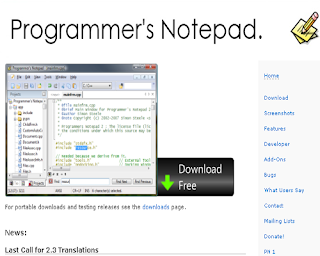
8. Programmer’s Notepad (Windows) (FREE)

Programmer’s Notepad is an open-source text editor targeted at users who work with source code. Features of Programmer’s Notepad:
  • Bookmarks (both numbered and plain)
  • Code Folding/Outlining
  • Docking tool windows
  • Excellent external tool support with user-configurable output matching
  • Export to HTML (using CSS) and RTF
  • File association manager
  • In-file method/definition navigation (using Ctags)
  • No limit on file size (although large files may take a while to load)
  • Non fixed-width font support
  • Projects and Project Groups with multi-level folders and file system mirroring
  • Quick Search toolbar with links to Google and Google Groups
  • Regular expression search and replace
  • Support for unicode files
  • Support for windows, unix and macintosh file formats
  • Syntax highlighting for many languages through “schemes”.
  • Tabbed MDI interface
  • Text Clips
  • Unlimited number of schemes supported, powerful syntax highlighting supporting both user-defined and built-in schemes
  • User-defined schemes (XML)
  • Word-wrapping
 

9. PSPad (Windows) (FREE)

 
PSPad editor is a freeware text editor and source editor intended for use by programmers. Features of PSPad: The universal freeware editor, useful for people who: 
  • Work with plain text
  • Create web pages
  • Want to use a good IDE for their compiler
 

10. HTML-Kit (Windows) (FREE)

  HTML-Kit is an HTML editor for Microsoft Windows. The application is a full-featured HTML editor designed to edit, format, validate, preview and publish web pages in HTML, XHTML and XML -languages. Features of HTML-Kit
  • Navigate tags and scripts
  • Code Folding
  • Batch Search and Replace
  • Upload Options
  • Incremental Search and Go-To
  • File Versioning and Auto Backup
  • HTML-Kit Shorthand
  • Not Lost in Translation
  • Remote Editing with Local Copy
  • Dockable Plugins
  • Paste Plus
  • Native Unicode Support
  • Multi-Page Templates
  • Re-order Document Tabs
 

11. EditPlus (Windows) (FREE Trial; $35)

EditPlus is a text editor, HTML editor, PHP editor and Java editor for Windows. While it can serve as a good Notepad replacement, it also offers many powerful features for Web page authors and programmers. Features of EditPlus:
  • Multiple document interface
  • Overlappable windows
  • Tabbed document interface
  • Window splitting
  • Spell checking
  • Regex-based find & replace
  • Encoding conversion
  • Newline conversion
  • Syntax highlighting
  • Multiple undo/redo
  • Rectangular block selection
  • Bracket matching
  • Auto indentation
  • Auto completion
  • Code folding (Text folding)
  • Compiler integration
 

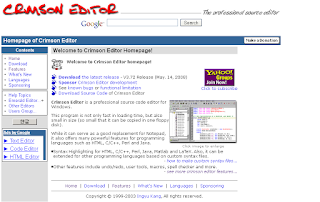
12. Crimson Editor (Windows) (FREE)

Crimson Editor is a professional source code editor for Windows. This program is not only fast in loading time, but also small in size (so small that it can be copied in one floppy disk). Features of Crimson Editor:
  • Edit multiple documents
  • Syntax highlighting
  • Multi-level undo / redo
  • Project management
  • Directory tree view window
  • Find & Replace
  • Column mode editing
  • Natural word wrapping
  • Spell checker
  • User tools and macros
  • Edit remote files directly using built-in FTP client
  • Print & Print preview
 

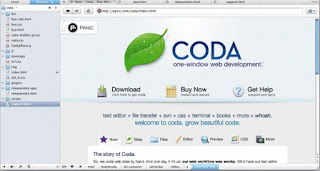
13. Coda (Mac OS X) (99$)

Coda is a $99 commercial web development application for Mac OS X, developed by Panic. Features of Coda:
  • Plug-ins
  • Open quickly
  • Smart Spelling
  • Subversion
  • Find across files
 

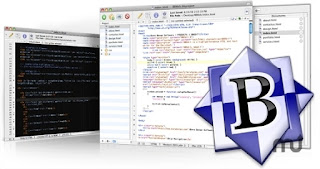
14. BBEdit (Mac OS X) (FREE Trial; From $49 to $125)


 Whenever you need to work with text, whether you want to create or maintain a Web site, write a program or shell script, search log files and extract data, or write a few paragraphs (or pages, or books), BBEdit offers what you need to make accomplishing your task quicker and easier. BBEdit 9 adds over one hundred new features and over one hundred improvements over the previous version. Features of BBEdit:
  • Text Handling
  • Web Development
  • Programming
  • File Handling
  • Display
  • Search
  • UNIX & Admin
 

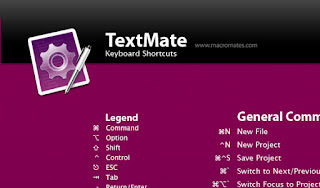
15. TextMate (Mac OS X) (FREE Trial; €48.75)


TextMate brings Apple’s approach to operating systems into the world of text editors. By bridging UNIX underpinnings and GUI, TextMate cherry-picks the best of both worlds to the benefit of expert scripters and novice users alike. Features of TextMate:
  • Ability to Search and Replace in a Project
  • Auto-Indent for Common Actions Like Pasting Text
  • Auto-Pairing of Brackets and Other Characters
  • Clipboard History
  • Column Selections and Column Typing
  • Completion of Words from Current Document
  • CSS-like Selectors to Pinpoint the Scope of Actions and Settings
  • Declarative Language Grammars for Graceful Mixing and Hacking
  • Dynamic Outline for Working With Multiple Files
  • Expand Trigger Words to Code Blocks With Tab-able Placeholders
  • File Tabs when Working With Projects
  • Foldable Code Blocks
  • Function Pop-up for Quick Overview and Navigation
  • Plug-able Through Your Favorite Scripting Language
  • Recordable Macros With No Programming Required
  • Regular Expression Search and Replace (grep)
  • Run Shell Commands from Within a Document
  • Support for Darcs, Perforce, SVK, and Subversion
  • Support for More Than 50 Languages
  • Switch Between Files in Projects With a Minimum of Key Strokes
  • Themable Syntax Highlight Colors
  • Visual Bookmarks to Jump Between Places in a File
  • Works As External Editor for (s)ftp Programs
  • Works Together With Xcode and Can Build Xcode Projects
 

16. SubEthaEdit (Mac OS X) (FREE Trial; €29)


 SubEthaEdit is a powerful and lean text editor. And it’s the only collaborative one that is a joy to use. By combining the ease of Bonjour with the world’s best text collaboration engine, it makes working together not only possible but even fun… Features of SubEthaEdit: SubEthaEdit includes various advanced features: A UNIX command line utility to enable complex and interactive pipe workflows with your terminal. Overhauled printing, including all bells and whistles, even with collaborative metadata. Exporting to HTML, again with metadata. Completely user customizable syntax highlighting through styles. Support for editing files as administrator. Improved AppleScript support to allow control of sharing features.  

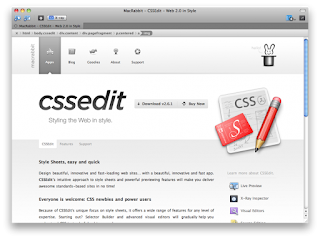
17. CSSEdit (Mac OS X) (FREE Trial; $39.95)


    Design beautiful, innovative and fast-loading web sites… with a beautiful, innovative and fast app. CSSEdit’s intuitive approach to style sheets and powerful previewing features will make you deliver awesome standards-based sites in no time! Features of CSSEdit: With CSSEdit, you see changes to your style sheet applied in real-time. Without saving. Without uploading. Without hassle. For any Web App or HTML file. You can edit style sheets for absolutely any site, on- or offline. Thanks to our innovative Override technology, you can even apply your open style sheets to any site and see it change instantly! Styling a Web App used to be a cycle of type — upload — refresh. CSSEdit destroys this waste of time. Making your Web 2.0 App beautiful is now easy and productive.  

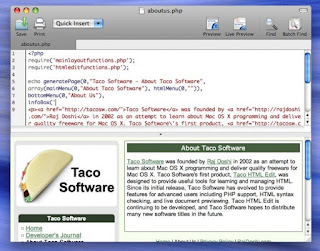
18. Taco HTML Edit (Mac OS X) (FREE Trial; $24.95)


Taco HTML Edit is the premier HTML editor and PHP editor for the Mac. As an HTML editor, Taco HTML Edit empowers its users to rapidly create their own web sites. It is designed exclusively for Mac OS X and has many advanced features including spell checking, live browser previewing, PHP previewing, syntax checking, and much more. Features of Taco HTML Edit:
  • Component Library
  • Code Coloring
  • Preview
  • Code Completion
  • Syntax Checking
  • Live Preview
  • Code Clips

19. skEdit (Mac OS X) (FREE Trial; $34.95)


skEdit is a text editor for Mac OS X, aimed at web designers and programmers. Features of skEdit:
  • Tabbed interface
  • Project based site management
  • Code hinting and completion
  • Code folding
  • Code snippets
  • Syntax highlighting
  • File uploading and remote editing (using FTP, SFTP or WebDAV)
  • HTML Tidy integration
  • Search and replace with support for regular expressions

Which software for coding is your favorite? If you haven’t got one, now you certainly have some promising programs to choose from!      
Share:

Create a Developer account on PlayStore and Submit Your app (Bangla Tutorial)


āϏāĻŦাāϰ āφāĻ—ে āφāĻĒāύাāϰ āϝা āϞাāĻ—āĻŦে āϤা āĻšāϚ্āĻ›ে āĻāĻ•āϟা āĻ—ুāĻ—āϞ āĻāĻ•াāωāĻŖ্āϟ। āĻŦা Gmail āĻāĻ•াāωāĻŖ্āϟ।

āĻāĻ•াāωāύ্āϟ āĻĨাāĻ•āϞে āĻ­াāϞো, āύা āĻĨাāĻ•āϞে āĻāĻ•āϟা āĻ–ুāϞে āύিāϤে āĻĒাāϰে।

āĻāϰāĻĒāϰ https://play.google.com/apps/publish/ āϞিāĻ™্āĻ•ে āĻ—ি⧟ে āϞāĻ—িāύ āĻ•āϰুāύ। āφāĻ—ে āĻ—ুāĻ—āϞ āĻāĻ•াāωāύ্āϟে āϞāĻ—িāύ āĻ•āϰা āĻĨাāĻ•āϞে āφāϰ āϞāĻ—িāύ āĻ•āϰāϤে āĻšāĻŦে āύা। āϏāϰাāϏāϰি āύিāϚেāϰ āĻŽāϤ āĻĒেāχāϜে āύি⧟ে āϝাāĻŦেঃ


āĻāĻ–াāύে Agreement āĻ āĻ•্āϞিāĻ• āĻ•āϰে Continue to Payment āĻ āĻ•্āϞিāĻ• āĻ•āϰāϞে āĻĒāϰেāϰ āĻĒেāχāϜে āύি⧟ে āϝাāĻŦে।

āĻāϰāĻĒāϰ āφāĻĒāύি āύিāϚেāϰ āĻŽāϤ āĻāĻ•āϟা āĻĒāĻĒ āφāĻĒ  āĻĒাāĻŦেāύ। Start Now āϤে āĻ•্āϞিāĻ• āĻ•āϰুāύ।


āφāϰেāĻ•āϟা āĻĒেāχāϜ āĻ–ুāϞāĻŦে āĻŦা āĻāĻ•āχ āϟ্āϝাāĻŦে āύিāϚেāϰ āĻŽāϤ āĻāĻ•āϟা āĻĢāϰāĻŽ āĻĒাāĻŦেāύ। āĻāĻ–াāύেāχ āφāĻĒāύি āĻ•াāϰ্āĻĄ āχāύāĻĢāϰāĻŽেāĻļāύ āĻ—ুāϞো āϝুāĻ•্āϤ āĻ•āϰāϤে āĻšāĻŦেঃ


 āĻ—ুāĻ—āϞ āĻ“ā§ŸাāϞেāϟেāϰ āĻŽাāϧ্āϝāĻŽে ⧍ā§Ģ āĻĄāϞাāϰ āĻĒে āĻ•āϰাāϰ āϜāύ্āϝ āĻŦāϞāĻŦে। āϤাāϰ āϜāύ্āϝ āĻ—ুāĻ—āϞ āĻ“ā§ŸাāϞেāϟে āĻāĻ•āϟা āĻ•াāϰ্āĻĄ āϝুāĻ•্āϤ āĻ•āϰāϤে āĻšāĻŦে।

āϝে āĻ•োāύ āĻ•াāϰ্āĻĄ āĻšāϞেāχ āĻšāĻŦে, āĻŽাāϏ্āϟাāϰāĻ•াāϰ্āĻĄ, āĻ­িāϏা āĻ•াāϰ্āĻĄ, āĻ…্āϝাāĻŽেāϰিāĻ•াāύ āĻāĻ•্āϏāĻĒ্āϰেāϏ āχāϤ্āϝাāĻĻি। āĻ•াāϰো āϝāĻĻি āĻĒেāĻ“āύি⧟াāϰ āĻŽাāϏ্āϟাāϰ āĻ•াāϰ্āĻĄ āĻĨাāĻ•ে, āϤা āĻĻি⧟েāĻ“ āĻ•াāϜ āĻšāĻŦে। āύিāϜেāϰ āĻ•াāϰ্āĻĄ āĻĨাāĻ•āϤে āĻšāĻŦে, āĻāĻŽāύ āĻ“ āύা। āĻ…āύ্āϝ āĻĒāϰিāϚিāϤ āĻ•াāϰো āĻ•াāϰ্āĻĄ āĻ“ āĻŦ্āϝāĻŦāĻšাāϰ āĻ•āϰা āϝাāĻŦে।

āĻŦিāĻĻ্āϰঃ āĻŦাংāϞাāĻĻেāĻļ āĻĨেāĻ•ে āχāϏ্āϝু āĻ•ৃāϤ āĻšāϞে āϏাāϧাāϰāύāϤ āĻ•াāϰ্āĻĄ āĻĻি⧟ে āχāύ্āϟাāϰāύেāϟে āĻĒেāĻŽেāύ্āϟ āĻ…āĻĒāĻļāύāϟি āĻŦāύ্āϧ āĻĨাāĻ•ে। āϤা āĻŦ্āϝাংāĻ•ে āϝোāĻ—াāϝোāĻ— āĻ•āϰে āĻ•ā§ŸেāĻ• āĻĻিāύেāϰ āϜāύ্āϝ āχāύ্āϟাāϰāύেāϟে āĻĒেāĻŽেāύ্āϟ āĻĻেāĻ“ā§Ÿাāϰ āϜāύ্āϝ āĻ“āĻĒেāύ āĻ•āϰা āϝা⧟। 

āĻ•াāϰ্āĻĄ āύাāĻŽ্āĻŦাāϰ, āĻ•াāϰ্āĻĄেāϰ āĻŽে⧟াāĻĻ āωāϤ্āϤিāϰ্āĻŖ āϤাāϰিāĻ– āĻāĻŦং ā§Š/ā§Ē āĻĄিāϜিāϟেāϰ āĻ•োāĻĄ। āĻāĻ—ুāϞো āĻĻেāĻ“ā§Ÿাāϰ āĻĒāϰ Accept and Continue āĻ•āϰāϞে āφāĻĒāύাāĻ•ে āĻ—ুāĻ—āϞ āĻĒ্āϞে āĻĄেāĻ­েāϞāĻĒাāϰ āĻ•āύāϏোāϞে āύি⧟ে āϝাāĻŦে। āϝেāĻ–াāύে āφāĻĒāύি āĻ…্āϝাāĻĒ āφāĻĒāϞোāĻĄ āĻ•āϰāϤে āĻĒাāϰāĻŦেāύ। āφāĻĒāύাāϰ āĻ•াāϰ্āĻĄে āĻŽিāύিāĻŽাāĻŽ ā§¨ā§Ž āĻĄāϞাāϰ āĻĨাāĻ•āϤে āĻšāĻŦে। āĻ—ুāĻ—āϞ āĻ“ā§ŸাāϞেāϟ āĻāĻ•াāωāĻŖ্āϟ āĻ–োāϞাāϰ āϏāĻŽā§Ÿ āĻ•াāϰ্āĻĄ āĻ­েāϰিāĻĢিāĻ•েāĻļāύেāϰ āϜāύ্āϝ āĻ›োāϟ āĻ›োāϟ āĻĻুāχāϟা āĻāĻŽাāωāύ্āϟ āĻ•েāϟে āύে⧟ āĻ—ুāĻ—āϞ। āĻĒāϰে āϝে āĻ—ুāϞো āφāĻŦাāϰ āφāĻĒāύাāϰ āĻ•াāϰ্āĻĄে āĻĒাāĻ ি⧟ে āĻĻেāĻ“ā§Ÿা āĻšā§Ÿ।

āĻĒেāĻŽেāύ্āϟ āĻ•āύāĻĢাāϰāĻŽেāĻļāύ āĻāϰ āϜāύ্āϝ ⧍ā§Ē āϘāύ্āϟা āϏāĻŽā§Ÿ āύে⧟। āϝāĻĻিāĻ“ āφāĻĒāύি āĻĒেāĻŽেāύ্āϟ āĻ•āϰাāϰ āĻĒāϰ āĻĒāϰāχ āĻ—ুāĻ—āϞ āĻĒ্āϞে āϏ্āϟোāϰ āĻĄেāĻ­েāϞāĻĒাāϰ āĻ•āύāϏোāϞে āĻ…্āϝাāĻĒ āφāĻĒāϞোāĻĄ āĻ•āϰা āĻļুāϰু āĻ•āϰāϤে āĻĒাāϰāĻŦেāύ।

āφāĻĒāύাāϰ āĻ•োāύ āĻ•াāϰ্āĻĄ āύা āĻĨাāĻ•āϞে āĻĢ্āϰিāϤে āĻĒেāĻ“āύি⧟াāϰেāϰ āĻŽাāϏāϟাāϰ āĻ•াāϰ্āĻĄ āφāύāϤে āĻĒাāϰেāύ। āĻāĻŦং āϤা āĻĢ্āϰি। āĻāĻ–াāύে āĻ•্āϞিāĻ• āĻ•āϰে āĻāĻ•াāωāĻŖ্āϟ āĻ•āϰāϞে āϤাāϰা āφāĻĒāύাāϰ āĻāĻ•াāωāύ্āϟে āĻ•াāϰ্āĻĄ āĻĒাāĻ ি⧟ে āĻĻিāĻŦে। āĻĒāϰে āϐ āĻ•াāϰ্āĻĄ āĻ“ āφāĻĒāύি āĻĒ্āϞে āϏ্āϟোāϰে āĻāĻ•াāωāύ্āϟ āĻ•āϰাāϰ āϜāύ্āϝ āĻŦ্āϝāĻŦāĻšাāϰ āĻ•āϰāϤে āĻĒাāϰāĻŦেāύ।

āĻĄেāĻ­েāϞāĻĒাāϰ āĻ•āύāϏোāϞ āĻĻেāĻ–āϤে āύিāϚেāϰ āĻŽāϤ।


āĻāĻ–াāύে Add New Application āĻ āĻ•্āϞিāĻ• āĻ•āϰে āύāϤুāύ āĻ…্āϝাāĻĒ āφāĻĒāϞোāĻĄ āĻ•āϰāϤে āĻĒাāϰāĻŦেāύ।  Add New Application  āĻ āĻ•্āϞিāĻ• āĻ•āϰāϞে āĻāĻ•āϟা āĻĒāĻĒ āφāĻĒ āĻ“āĻĒেāύ āĻšāĻŦে। āύিāϚেāϰ āĻŽāϤঃ


āĻ…্āϝাāĻĒ āĻāϰ Title / Name āĻĻি⧟ে Upload APK āϤে āĻ•্āϞিāĻ• āĻ•āϰāϞে āφāĻĒāύাāϰ āĻāĻ•্āϏāĻĒোāϰ্āϟ āĻ•āϰা APK āĻĢাāχāϞāϟি āφāĻĒāϞোāĻĄ āĻ•āϰāϤে āĻĒাāϰāĻŦেāύ। āĻŦা Prepare Store Listing āĻ āĻ•্āϞিāĻ• āĻ•āϰে āĻ…্āϝাāĻĒ āĻāϰ āĻŦিāĻ­িāύ্āύ āϤāĻĨ্āϝ āφāĻ—ে āϏেāĻ­ āĻ•āϰে āϰাāĻ–āϤে āĻĒাāϰāĻŦে। āϏāĻ•āϞ āϤāĻĨ্āϝ āĻ িāĻ• āĻŽāϤ āĻĻেāĻ“ā§Ÿা āĻšāϞে āĻĄাāύ āĻ•োāύা⧟ āϞেāĻ–া āωāĻ āĻŦে Ready To Publish , āĻāĻ–াāύে āĻ•িāĻ•্āϞ āĻ•āϰāϞেāχ āĻ…্āϝাāĻĒāϟি āĻ—ুāĻ—āϞ āĻ­্āϝাāϰিāĻĢাāχ āĻ•āϰে āĻĒ্āϞে āϏ্āϟোāϰে āĻāĻĒ্āϰুāĻ­ āĻ•āϰে āĻĻিāĻŦে। āϏাāϧাāϰāύāϤ ā§Ē-ā§Ģ āϘāύ্āϟাāϰ āĻŽāϧ্āϝেāχ āĻ…্āϝাāĻĒāϟি āĻ—ুāĻ—āϞ āϰিāĻ­িāω āĻ•āϰে āĻĒ্āϞে āϏ্āϟোāϰে āĻāĻĒ্āϰুāĻ­ āĻ•āϰে।


āϏāĻŦাāϰ āϜāύ্āϝ āĻļুāĻ­ āĻ•াāĻŽāύা 🙂


 āĻ­ুāϞ āϧাāϰāύা āĻ—ুāϞোঃ
āĻĒ্āϞে āϏ্āϟোāϰে āĻ…্āϝাāĻĒ āφāĻĒāϞোāĻĄ āĻ•āϰāϞেāχ āϟাāĻ•া āϜāĻŽা āĻšāϤে āĻļুāϰু āĻšāĻŦে! āύা, āĻāĻŽāύ āύা। āĻĒ্āϞে āϏ্āϟোāϰে āφāĻĒāύি āĻŦাংāϞাāĻĻেāĻļ āĻĨেāĻ•ে āĻļুāϧু āĻŽাāϤ্āϰ āĻĢ্āϰি āĻ…্āϝাāĻĒ āφāĻĒāϞোāĻĄ āĻ•āϰāϤে āĻĒাāϰāĻŦে। āφāϰ āĻĢ্āϰি āĻ…্āϝাāĻĒ āĻĨেāĻ•ে āĻ•োāύ āϰেāĻ­িāύিāω āφāϏāĻŦে āύা। āĻĢ্āϰি āĻ…্āϝাāĻĒ āĻŦিāĻ­িāύ্āύ āĻ­াāĻŦে āĻŽাāύিāϟাāχāϜ āĻ•āϰা āϝা⧟। āϝেāĻŽāύ āĻ…্āϝাāĻĄ āĻĻি⧟ে। āφāĻĒāύি āĻ…্āϝাāĻĒে āĻ…্āϝাāĻĄ āĻĻিāϞে āφāĻĒāύাāϰ āϝে āĻ–াāύ āĻĨেāĻ•ে āĻ…্āϝাāĻĄ āĻĻিāĻŦেāύ, āϝেāĻŽāύ AdMob, InMobi, MobFox āϏāĻš āφāϰো āĻ…āύেāĻ•।  āϐ āĻāĻ•াāωāĻŖ্āϟে āφāĻĒāύাāϰ āϰেāĻ­িāύিāω āϜāĻŽা āĻšāĻŦে। āĻ—ুāĻ—āϞেāϰ āĻĄেāĻ­েāϞāĻĒাāϰ āĻāĻ•াāωāĻŖ্āϟে āύা।

āϝে āĻ•াāϰ্āĻĄ āĻĻি⧟ে āφāĻĒāύি āĻāĻ•াāωāύ্āϟ āĻ–ুāϞāĻŦেāύ, āϐ āĻāĻ•াāωāĻŖ্āϟেāĻ“ āϟাāĻ•া āϜāĻŽা āĻšāĻŦে āύা। āϝāĻĻি āĻ…্āϝাāĻĄ āĻĻি⧟ে āĻĨাāĻ•েāύ, āϐ āĻāĻ•াāωāύ্āϟ āĻĨেāĻ•ে āĻĒāϰে āϟাāĻ•াāϟা āĻŦ্āϝাংāĻ•ে āĻŦা āĻ…āύ্āϝ āϝে āĻ•োāύ āĻŽাāϧ্āϝāĻŽে āφāύāϤে āĻĒাāϰāĻŦেāύ।

āĻ•āĻŽāύ āĻĒ্āϰāĻļ্āύঃ
āĻŦাংāϞাāĻĻেāĻļ āĻĨেāĻ•ে āĻ•ি āĻĒেāχāĻĄ āĻ…্āϝাāĻĒ āϏাāĻŦāĻŽিāϟ āĻ•āϰা āϝা⧟?

āϏংāĻ•্āώিāĻĒ্āϤ āωāϤ্āϤāϰ āύা।

āĻ•িāύ্āϤু āφāĻĒāύি āϚাāχāϞে āĻŦুāĻĻ্āϧি āĻ–াāϟি⧟ে āϏাāĻŦāĻŽিāϟ āĻ•āϰāϤে āĻĒাāϰেāύ। āϤāĻŦে āϤাāϰ āϜāύ্āϝ āĻŦিāĻĻেāĻļে āϝে āϏāĻŦ āĻĻেāĻļ āϏাāĻĒোāϰ্āϟ āĻ•āϰে, āϏে āϏāĻŦ āĻĻেāĻļ āĻĨেāĻ•ে āφāĻĒāύাāϰ āĻĢ্āϰেāύ্āĻĄ āĻŦা āĻĢ্āϝাāĻŽিāϞিāϰ āĻ•াāϰো āĻšেāϞ্āĻĒ āύিāϤে āĻšāĻŦে। āϤাāĻĻেāϰ āĻĻি⧟ে āĻāĻ•াāωāύ্āϟ āĻ–ুāϞি⧟ে āύি⧟ে āϤাāϰāĻĒāϰ āφāĻĒāύি āĻŦাংāϞাāĻĻেāĻļ āύা, āϝে āĻ•োāύ āĻĻেāĻļ āĻĨেāĻ•েāχ āĻĒেāχāĻĄ āĻ…্āϝাāĻĒ āϏাāĻŦāĻŽিāϟ āĻ•āϰāϤে āĻĒাāϰāĻŦেāύ।

āĻŦাংāϞাāĻĻেāĻļ āĻĨেāĻ•ে āĻĒেāχāĻĄ āĻ…্āϝাāĻĒ āϏাāĻŦāĻŽিāϟ āĻ•āϰা āϝা⧟ āύা, āĻ•াāϰāĻŖ āĻŦাংāϞাāĻĻেāĻļ āĻĨেāĻ•ে āĻ—ুāĻ—āϞ āĻŽাāϰāϚেāύ্āϟ āĻāĻ•াāωāύ্āϟ āĻ–োāϞা āϝা⧟ āύা। āĻŽাāϰāϚেāύ্āϟ āĻāĻ•াāωāύ্āϟ āĻ›া⧜া āφāĻĒāύাāϰ āĻ…্āϝাāĻĒ āĻŦিāĻ•্āϰি āĻ•āϰাāϰ āĻĒāϰ āϟাāĻ•া āϜāĻŽাāϰ āĻ•োāύ āĻŦ্āϝāĻŦāϏ্āĻĨা āύেāχ।  āϤাāχ।

Share:

GET LATEST UPDATE by EMAIL